

Senior manager overview
Find organisation-wide settings and guidance for Provider Senior Managers.
Provider Senior Managers manage training across every Home in the Provider. You can also manage user access, add courses and external record types, create Learning Paths and manage Bank Staff. If your organisation uses the Register, you can review it here too.
This guide covers the tasks and settings available to senior managers. Manager overview explains the shared screens.
Find a task
Compare training across Homes.
Choose which courses appear in the Matrix.
Manage Home Staff and Bank Staff records.
Manage sign-in access and permissions.
Add courses and external record types.
Assign training across Home Staff and Bank Staff.
Create and edit Learning Paths.
Schedule training across the Provider.
Use Register to review training sign-ins when it is enabled.
Review recorded activity across Homes.
What's different from a Home Manager
| Home Manager | Provider Senior Manager | |
|---|---|---|
| Scope | Their assigned Homes | Every Home in the provider |
| Own training | Learning section when a training profile is attached | Learning section when a training profile is attached |
| Permissions | No access | Full user management |
| Course Library | View and assign only | Can add courses and external records |
| Learning Paths | View and assign | Can create and edit |
| Bank Staff | Read-only profiles, with attendance and evidence actions on authorised sessions | Can onboard and manage |
| Assigning | Home Staff only | Home Staff, Bank Staff, or both |
Find the senior manager menu
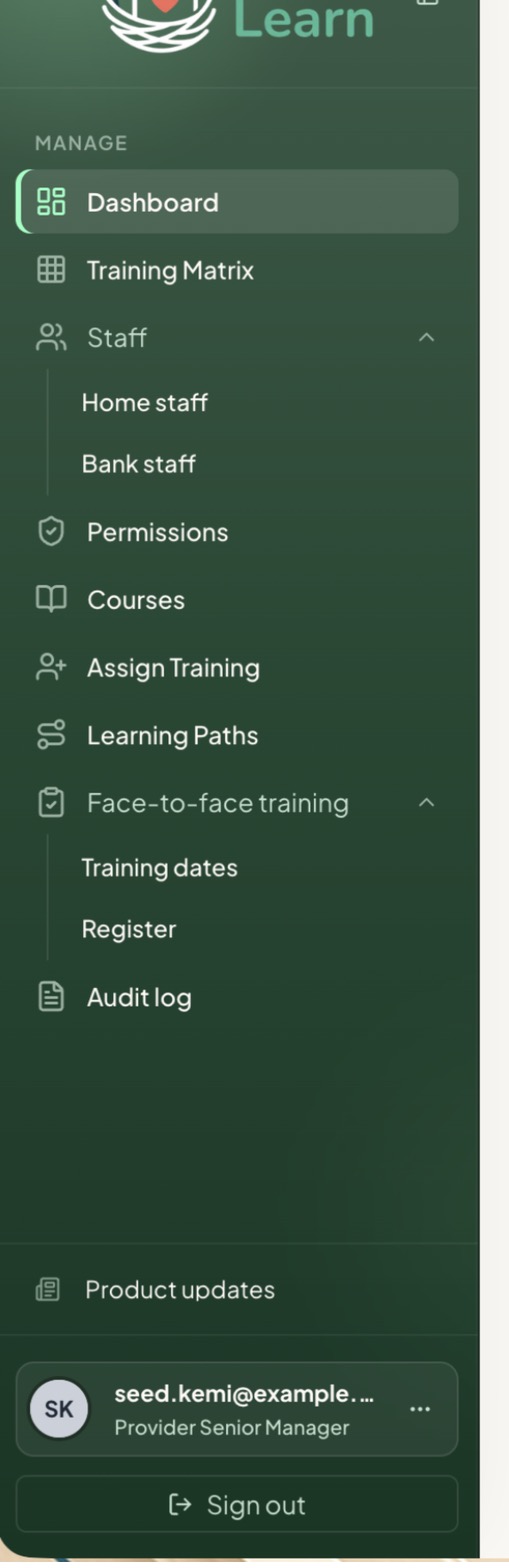
Your own training
You can have management access and a training profile on the same login. Once a training profile is attached, the Learning section gives you My training, My courses and Upcoming. Use Your training for your own learning.
To add a training profile to an existing senior-manager login:
- Open Staff, then Home staff, and select Onboard staff.
- Choose Use existing manager workflow and select the eligible manager.
- Add their Home, job role and start dates. Tick any Learning Paths you want to assign.
- Review and save. Their existing login and management permission are kept.
If the option isn't offered for that person, ask an authorised senior manager or Nest for help.
Attendance and evidence on your own recordAnother authorised manager must record attendance and manage evidence on your own training record.
Common questions
Do I need a second login to do my own training?
No. An eligible senior-manager login can have a staff training profile attached. See Your own training above.
For help with changing an assigned Learning Path or Register availability, open the relevant task page.
Updated about 3 hours ago